When it comes to getting hired, first impressions matter.
Fortunately, there are several ways to make a positive first impression on your future employer both online and in person. Whether you use your resume, LinkedIn profile, or biography, you should consider these application materials as value propositions — because essentially they are.
A value proposition is a business term that encompasses materials used to market a service or product. Companies use value propositions to persuade prospective clients to choose them based on the value they can bring to the client’s life or business. You can use this strategy in your application materials. Aim to persuade potential employers by demonstrating the value you can bring to their brand.
What Values Should You Highlight?
When you begin your job search, it can be challenging to know what qualities to highlight in your application materials. Editing your resume and LinkedIn profile to list your most up-to-date technical skills and qualities is an ongoing process, but there are some essential skills you can use to improve your resume at any stage:
Candidate Skills
Once you’ve homed in on the jobs you want, one of the first steps toward demonstrating your worth is including the right hard skills. These are technical abilities you’ve gained through education or experience — such as computer skills, data analysis, or editing.
How do you know which hard skills to include? Start by considering the company goals of the organization you’re interested in. Gaining an understanding of the work it does and the ways you can concretely contribute to its goals will put you on the right track when crafting your resume and professional profiles.
When listing your hard skills, the goal is to demonstrate why you would provide a skill-based fit for the company. Craft your resume to include your most relevant work experience. Make sure to go into detail about the hard skills you have, how you’ve earned them, and the ways you have amassed a proven track record of using them in a professional setting.
Cultural Skills
While hard skills are certainly valuable, cultural skills can be equally as important during the hiring process. How can you demonstrate to your prospective employer that you will be a great cultural fit for their organization? You can highlight an awesome cultural fit by clearly emphasizing the right soft skills — such as time management, organization, initiative, and leadership.
One way to tailor the soft skills on your resume to match the needs of your employer is to clearly display that your employee goals align with the company’s goals. A cultural fit is based on the way you will mesh with other employees, contribute to positive workplace culture, and inspire continued productivity. When your goals and values as an employee align with the goals of your employer, a cultural fit is natural.
Value-Added Statements
To paint an undeniable picture of the benefit you will bring to your prospective employer, it’s important to use value-add statements — also known as value-added statements — to your resume, profile, and bios.
In business, value-added statements are documents that outline the positive outcome a product or service can bring to its customers, often monetarily. When crafting your resume and profiles, using a value-added strategy can quickly elevate your application materials.
On your resume, you can incorporate value-added statements in the description of your work experience. For example, rather than simply mention that you’ve improved sales at your previous companies, include specific examples with strong action words. “Boosted sales by 3% over six months” provides a concrete example of the value you bring to a company.
Whenever possible, use specific details to describe your soft skills, too. For example, “managed a team of 20 professionals with collaboration and leadership skills” is more persuasive than simply listing “collaborative” or “strong leadership skills.”
Once you’ve crafted value-added skills for your resume, you can easily weave them into your professional profiles and bio to paint a vivid picture of the worth you will bring to an employer.
How Capstone Resumes Can Help
The way you craft your resume, LinkedIn profile, and professional biography will depend on the industry and type of job you’re vying for. No matter what your professional goals are, it is important to illustrate the concrete ways you can help employers reach their goals.
It can be challenging to identify which of your skills and qualities align most with potential employers. Making these connections can help you land among the top applicants at your ideal company. Fortunately, Capstone Resume Services can help you zero in on your most important strengths and showcase them to prospective employers.
]]>
If you’re looking for a job during the COVID-19 era, you’re probably eager for things to get back to “normal,” whatever that may look like. The global crisis has had a massive impact on the job market. Unemployment rates have spiked, some companies have shut down altogether, and many offices have transitioned to a completely virtual setup.
In June 2020, a poll found that approximately 42% of Americans were working remotely, 26% were working in-person, and 33% were not working. Regardless of what comes next, it’s clear there has been a significant shift in the workforce — and workplaces may never look the same.
Even if you feel anxious about employment, you shouldn’t give up hope. While the job market may be uncertain at the moment, new opportunities are emerging every day. Remote jobs, new career paths, and unexpected employment opportunities are out there — you just need to know how to find them.
Here are a few strategies you can use to make the most of your pandemic-era job search and prepare for the future of employment.
Navigating Your Job Search
Finding the right job is a challenge even in the best of times, and a pandemic can make it feel impossible. Searching for employment during these times may require changing your mindset and opening up to new possibilities. We have a few strategies that may help make your job search easier.
Look For New Opportunities
After COVID-19 hit, some industries started drying up. But even if a few opportunities fell through, new ones may have emerged due to the pandemic. Take a moment to consider what kinds of new roles are out there.
This might mean broadening your search and stepping out of your comfort zone. Job seekers are now more likely to transition to another industry than they were before the pandemic. We suggest reflecting on how your skills, experience, and interests could open up new possibilities in different roles — within your industry or even outside of it.
Expand Your Location Preferences
When expanding your job search, don’t forget about location. While the opportunities in your area might be scarce, the rise of remote work and work-from-home positions means that you don’t need to limit yourself to the local market.
Some companies may transition back to in-person work, but many organizations will likely embrace remote work permanently.
Stay Informed
Keep an eye on the news in your industry as the pandemic unfolds. Stay informed by reading news articles and online conversations, along with following leaders in your industry on social platforms like LinkedIn.
How are companies adapting to the pandemic and recession? While some businesses may suffer during COVID, others may be innovating and thriving. Knowing this information can help you find the right opportunity and market yourself as a valuable addition.
How To Prepare For a Virtual Interview
Just as many workplaces have gone completely online, interviews have also transitioned to the digital realm. This creates new challenges that force candidates to acclimate to the less-personal Zoom interview.
On top of technical issues, the lack of face-to-face connection can make it difficult to sell your skills and make a solid first impression. We’ve shared a few tips to help you land the job by phone or video chat.
Make the Right Digital Impression
In a digital interview, you won’t get the chance to make that in-person first impression. This means that your supporting documents need to be perfect. Refresh your resume and cover letter to make them sharp, engaging, and full of the right skills and keywords your potential employer is looking for.
Now that so much has shifted online, your internet presence is also more important than ever. Before the interview even starts, take another look at your LinkedIn and other social media profiles, to ensure your digital self is well-represented.
Improve Your Skills
In a job interview during or post-pandemic, an employer might ask what you’ve been doing during the lockdown. This is your chance to show them how you’ve been building up your skillset, whether this means taking classes, keeping up with industry news, or teaching yourself new skills.
Practice Your Interview Presence
One of the challenges of the virtual interview is that you might appear distanced from the employer. You can’t make eye contact, give them a handshake, or demonstrate the engaged and attentive presence you might normally.
Do your best to present yourself as you would in a normal interview. Practice your questions ahead of time, focus on sitting up straight and pulling your shoulders back, and make eye contact with the camera.
Check Your Connection & Devices
The last thing you want in an interview is a lagging internet connection or a sudden technical malfunction. Make sure your laptop is fully charged and that your Wi-Fi is working properly.
Pick an area free of distractions with a clean and simple background. We suggest dressing professionally from head to toe, even if you’re only visible from waist up.
A few minutes before the interview, pull up your Zoom camera to double-check your posture and make sure you’re centered on the screen.
Moving Forward With Your Search
While things may seem difficult right now, it won’t feel that way for long. With the distribution of the vaccine, more businesses will likely start hiring again, creating more job openings and reviving industries.
Even as things start to improve, some recent shifts might be here to stay, like remote work opportunities. As you move forward in your job search, look toward the future and embrace the new opportunities that are headed your way.
Looking to step up your resume for the next stage of your job search? In an increasingly competitive market, a professional resume service can help you stand out from the crowd. Take a look at Capstone’s services and schedule a consultation to learn more about how we can take your resume to the next level.
]]>
LinkedIn is known for constantly evolving, frequently making changes and adding new features. So, it should come as no surprise that the popular professional networking platform has made some changes to its interface and features recently.
At Capstone Resume Services, we believe LinkedIn is a powerful job search tool that can help you enhance your professional brand, broaden your network, and even land that dream job. That’s why it’s so important to stay up-to-date on the latest LinkedIn updates.
To ensure you’re getting the most out of LinkedIn and using it to its fullest potential, we thought we’d take this opportunity to highlight some of the platform’s more notable changes.
LinkedIn Profile Changes
LinkedIn has tweaked a few of its main profile features. Some adjustments may need to be made to your profile to ensure you are still making the best first impression possible. We recommend double-checking the following sections of your profile:
- Profile Picture – The LinkedIn profile picture now shows up as a square and is at the center of your profile, above your headline. Your profile photo is the first impression a recruiter has of you, so we recommend double checking it to ensure the change hasn’t impacted the cropping or overall appearance of the photo.
- Summary – Now, if a user wants to read your entire summary they have to click a “see more” button. Only the first two sentences appear automatically, which means they are more crucial than ever. If they aren’t engaging, chances are users will move on without reading your full summary.
- Skills – The top ten skills you were most endorsed for used to show up on your profile, now LinkedIn has limited it to three. This means it is important ensure the top skills that show on your profile are the most accurate and relevant. If the top three that are currently showing aren’t what you want, you can reorder them, regardless of the number of endorsements.
New LinkedIn Notifications
LinkedIn’s ‘Notifications’ tab brings you updates about your profile activity, connections, and network to help you stay more connected. Recently, the platform added two new types of notifications – The Daily Rundown and Search Appearances.
The Daily Rundown notification brings you a summary of the top news stories of the day to ensure you’re still informed even when you’re too busy to sit down and watch the news.
Search Appearances is one of our favorite new LinkedIn features, as it it allows you to see how many users found your profile through a LinkedIn search each week. It also shows you the top companies your searchers work for and what professions they work in. It also allows you to click on each company and see current job openings, as well as who their hiring managers are. This information is incredibly valuable, as it can help you make adjustments to your profile to ensure you are being found by those you’re hoping to target.
If you’re not quite sure how to go about optimizing your LinkedIn profile for your target audience, check out our tips for getting your LinkedIn profile noticed with keyword optimization!
Customize LinkedIn Notifications
You can now also customize your notifications, allowing you more control over what you see. LinkedIn’s new notification settings allow you to:
- Mute notifications
- Unfollow certain connections whose notifications aren’t relevant to you. (You’ll still be connected on LinkedIn, you just won’t see their updates)
- Turn off certain types of notifications, such as birthdays, published posts, etc.
LinkedIn Video Sharing
It’s no secret that native video is increasingly popular on social media networks. From Instagram Stories to Facebook Live and Twitter Live, all the major platforms have begun taking advantage of the popularity of video sharing. LinkedIn is the latest to join the trend. While LinkedIn currently allows users to embed videos in the summaries and experiences sections of their profiles, Business Insider reports that the platform is currently testing native video sharing.
Currently only a select few users have access to LinkedIn’s video sharing features, but it is expected to be rolled out to all users over the next few months. With this new feature, LinkedIn users will be able to take and upload videos in the LinkedIn app and share them as a status update. This will allow professionals to reach members of their network in a new and exciting way, adding a more personal touch. Users will also have access to video analytics, allowing them to learn more about the types of people who viewed their videos, such as where they work, their job title, etc. This information will be incredibly valuable in helping professionals and job seekers tailor their video updates to their target audience.
Industry experts also predict that live video streaming will be coming to LinkedIn in the near future.
Now that you’re up-to-date on all of LinkedIn’s latest changes, you can get to work updating your profile. If you still need some LinkedIn tips, we’ve written the following blogs to help ensure your LinkedIn profile will stand out to recruiters:
- Attract Recruiters with LinkedIn’s Open Candidates Feature
- How The New LinkedIn App Can Help You Land Your Job Search
- LinkedIn Etiquette
- Launching a Proactive Job Search on LinkedIn
- Use LinkedIn to Maximize Your Job Search
New to LinkedIn and not sure where to start? We can create a professional LinkedIn profile for you! Check out our LinkedIn Profile services for more information, and contact us today to speak with a Certified Professional Resume Writer.
]]>Let’s face it, starting your job search can be daunting. Especially when you’re currently employed. You want to search for a job privately, without alerting your boss or coworkers that you’ve rebooted your job search, but you don’t know how. Well, we have good news!
LinkedIn is making the process much easier with its new “Open Candidates” feature. LinkedIn Open Candidates allows you to turn on a signal that alerts recruiters that you’re open to potential job opportunities. The best part of Open Candidates is the level of discretion. Your LinkedIn connections will have no idea you’ve turned on Open Candidates, and neither will recruiters at your company or affiliated companies. Recruiters are privately notified that you’ve turned on Open Candidates, and when you turn the option on, you get the opportunity to specify the types of position you’re interested in and potential companies you’d like to work for.
To enable Open Candidates, go to the “Preferences” tab within the LinkedIn Jobs homepage and simply click “On.” From there, you can customize it to ensure you get job recommendations that are tailored to you. LinkedIn Open Candidates allows you to specify the cities you’re open to working in, the level of experience you have, the size company that is ideal for you, and the industries you’re pursuing. From there, when recruiters view your profile, they will see it flagged as “open to new opportunities.” According to their website, LinkedIn will also feature your profile in a special section that is exclusively for Open Candidate members.
Before you turn on Open Candidates, it’s important to be sure your profile is up to date. Since the Open Candidate feature makes it easier for recruiters to reach you and for opportunities to knock on your door, it’s important to show yourself in the best light. An outdated profile that doesn’t paint the full picture of your accomplishments and skills is not going to bring in the same opportunities as a fully optimized profile.
As you get your LinkedIn profile ready for the Open Candidates feature, keep these LinkedIn tips in mind:
Keep it professional. LinkedIn is not Facebook, Instagram, or Twitter. It’s important to post things that are relevant to your profession, industry, etc. Avoid mentioning anything related to political, religious, or personal beliefs. Treat it the same way you’d treat a cover letter, resume or job interview. If you wouldn’t say it to a potential employer, it’s best to keep it off LinkedIn.
Keep it updated. Before you turn on LinkedIn Open Candidates, take some time to review your profile with a critical eye and ask yourself a few questions. Is it updated with your current position, company, and the amount of time you’ve worked there? Are your relevant skills complete and current? Is your experience updated with what you’ve learned and accomplished in your current position? If you answered no to any of these questions, it’s important to set aside some time to update your profile and make sure it’s relevant for the types of positions you’re currently interested in.
Skills are important. According to LinkedIn, those that have 5 or more skills listed on their profile get 17 times more profile views than those with little to no skills. That being said, it’s important to think about the skills you’ve gained as you’ve progressed through your career and be sure they’re all included in your LinkedIn profile. If a skill is listed on your resume, it should be on your LinkedIn profile as well.
Go beyond your resume. LinkedIn is the perfect way to include everything you wish you could mention on your resume, but don’t have space for. It allows you to go into more detail, providing context and evidence to support the claims you make in your resume. You can also include examples of your work, certifications you may have, courses you’ve taken, and organizations you’re involved with, such as nonprofits or professional networking groups. LinkedIn allows you to paint a full picture of who you are and what you achieved, so it’s important that your profile is complete and detailed.
Keywords are ‘key.’ Recruiters on LinkedIn use keywords to search for applicants and find qualified candidates. Determine the keywords for your industry, including core competencies, skills, industry terms, etc, and be sure those keywords are included in your profile. This will make your profile more effective and ensure you’re found by both recruiters and automated search tools.
Learn New Skills with LinkedIn Learning
If you’re interested in a new role or are looking to move up in your career, LinkedIn also has a new LinkedIn Learning platform that makes it easier to learn the skills that are most important to your industry and/or profession. LinkedIn Learning suggests online courses that are recommended for you based off of your profile, and also highlights courses that are trending for those within your field. For example, if you’re a marketing manager, LinkedIn will show you a selection of the courses that are currently trending for Marketing Specialists, such as “Writing a Marketing Plan,” “Lead Generation Fundamentals,” and “Top 10 Marketing Challenges.” It will also show you courses trending in your industry, as well as the courses that are trending on LinkedIn Learning in general. Courses vary in length and the amount of time and commitment they take, but are provided by industry experts to help you learn new skills while enhancing your LinkedIn profile. LinkedIn is currently offering a free month trial for all LinkedIn members. To learn more about LinkedIn Learning, visit the LinkedIn Learning section of the job search platform.
If you’re interested in using LinkedIn’s Open Candidate feature but aren’t sure your LinkedIn profile is as effective as it could be, check out some of the past blogs we’ve written on the subject:
- Use LinkedIn to Maximize Your Job Search
- Launching a Proactive Job Search on LinkedIn
- LinkedIn Etiquette
- How the New LinkedIn Job App Can Help You Land Your Next Job
- Get Your Resume and LinkedIn Profile Noticed with Keyword Optimization
If you don’t currently have a LinkedIn profile or are struggling to update your existing one, Capstone Resume Services can help! We offer LinkedIn profile creation, and our Certified Professional Resume Writers will work with you to create an optimized profile that highlights your skills, experience, and achievements.
To jumpstart your job search and take the next step in your career, contact Capstone Resume Services today, or request a personal resume consultation.
]]>Recruiters pay attention to social profiles, and with 90% of employers recruiting via social media, it’s important to make sure your online presence is making the right impression. Your LinkedIn profile is likely very professional and chalked full of your experiences, accomplishments, and skills, but what about your profile photo?
You may not think the photo attached to your account is important, but it’s actually very telling to hiring managers. Your profile photo is the way you make your first impression on social media, and a recruiter can tell a lot about you from simply looking at your photo. They won’t look for very long, either. According to AvidCareerist, recruiters spend an average of 6 seconds looking at a LinkedIn profile, and it only takes 1/10th of a second for someone to form an impression from a photo. If the photo doesn’t convey the image a recruiter is looking for, it’s likely they’ll move on to another candidate’s profile without looking at your summary or experience.
According to Business Insider, your LinkedIn profile is 14 times more likely to be viewed if you have a profile photo, and the type of photo can greatly impact the way recruiters perceive you.
In a recent study, PhotoFeeler analyzed over 800 profile photos in their database to see “what elements reliably produce a better professional headshot photo,” and the results were very telling. The study didn’t factor in age, gender, or physical traits, only focusing on things that can be controlled, and then analyzed certain characteristics of the photos to determine how they impact competence, influence, and likability.
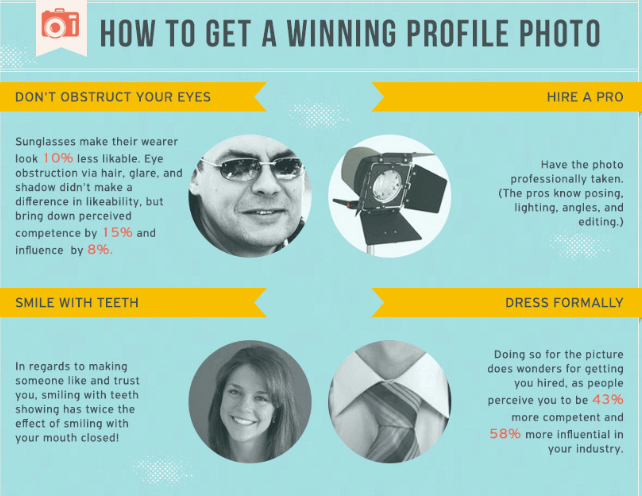
Courtesy of AvidCareerist & PhotoFeeler.
Using the results of the study and our own professional opinions, we’ve compiled some tips to help you select a profile photo that will convey the right image to hiring managers.
Approach it like an interview.
When you prepare for a job interview, you make sure to look the part. You look professional, put together, and are focused on making a good impression. Take the same approach when thinking about your profile photo. You wouldn’t walk into an interview looking ready for a night out on the town, so avoid using a photo from a recent girls or boys night out on your LinkedIn profile.
You also wouldn’t bring your significant other to meet a future employer, so be sure to leave them out of the photo. It’s also important to avoid cropping someone out of your photo, as it can make the image look less professional and diminish the quality.
Dress to impress.
When you walk into an interview, meeting, or corporate dinner, the way you dress directly impacts the way you are perceived. The same is true when it comes to your profile image. Those who are dressed up in their photos are perceived as 43% more competent and 58% more influential than those who aren’t dressed for success. To make a lasting impression, be sure to dress formally and professionally for your profile photo.
Don’t hide your eyes.
When taking your photo, be sure your eyes are visible. You may think sunglasses give off a cool, confident vibe, but they actually negatively impact your likability. PhotoFeeler’s study showed that sunglass wearers are 10% less likable, while those with their eyes obstructed by hair or shadows are perceived to be less competent and influential.
It is also important to make sure you aren’t staring down the camera. Eyes that are wide open seem to portray fear, while eyes that are “squinched,” or squinted slightly, help with competence, likability, and influence. Squinching – slightly squinting your eyes – will “portray comfort and confidence” to recruiters.
Don’t forget to smile.
You may want to look calm, cool, and collected for your profile photo, but according to the data, nothing impacts the way a photo is received more than a smile. Those who smile with their teeth showing have significantly greater likeability, competence, and influence than those who either don’t smile or don’t show their teeth. So, if you want your potential employer to trust you and have confidence in your abilities, be sure to smile for the camera.
At Capstone Resume Services, we want to help you put your best foot forward. Hopefully these tips will make the profile photo selection process easier, but if you’re still unsure about other aspects of your online presence, our certified resume writers can create a custom professional LinkedIn profile for you.
We also offer a variety of other resume writing services, and would love to help you stand out to hiring managers. Contact Capstone Resume Services today to schedule a personal resume consultation!
]]>