Recruiters pay attention to social profiles, and with 90% of employers recruiting via social media, it’s important to make sure your online presence is making the right impression. Your LinkedIn profile is likely very professional and chalked full of your experiences, accomplishments, and skills, but what about your profile photo?
You may not think the photo attached to your account is important, but it’s actually very telling to hiring managers. Your profile photo is the way you make your first impression on social media, and a recruiter can tell a lot about you from simply looking at your photo. They won’t look for very long, either. According to AvidCareerist, recruiters spend an average of 6 seconds looking at a LinkedIn profile, and it only takes 1/10th of a second for someone to form an impression from a photo. If the photo doesn’t convey the image a recruiter is looking for, it’s likely they’ll move on to another candidate’s profile without looking at your summary or experience.
According to Business Insider, your LinkedIn profile is 14 times more likely to be viewed if you have a profile photo, and the type of photo can greatly impact the way recruiters perceive you.
In a recent study, PhotoFeeler analyzed over 800 profile photos in their database to see “what elements reliably produce a better professional headshot photo,” and the results were very telling. The study didn’t factor in age, gender, or physical traits, only focusing on things that can be controlled, and then analyzed certain characteristics of the photos to determine how they impact competence, influence, and likability.
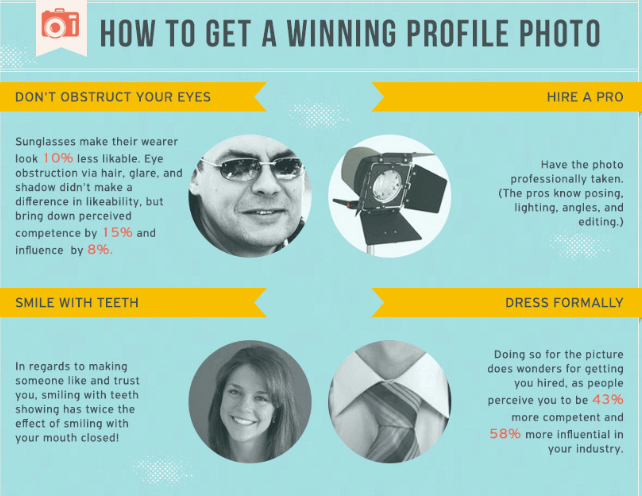
Courtesy of AvidCareerist & PhotoFeeler.
Using the results of the study and our own professional opinions, we’ve compiled some tips to help you select a profile photo that will convey the right image to hiring managers.
Approach it like an interview.
When you prepare for a job interview, you make sure to look the part. You look professional, put together, and are focused on making a good impression. Take the same approach when thinking about your profile photo. You wouldn’t walk into an interview looking ready for a night out on the town, so avoid using a photo from a recent girls or boys night out on your LinkedIn profile.
You also wouldn’t bring your significant other to meet a future employer, so be sure to leave them out of the photo. It’s also important to avoid cropping someone out of your photo, as it can make the image look less professional and diminish the quality.
Dress to impress.
When you walk into an interview, meeting, or corporate dinner, the way you dress directly impacts the way you are perceived. The same is true when it comes to your profile image. Those who are dressed up in their photos are perceived as 43% more competent and 58% more influential than those who aren’t dressed for success. To make a lasting impression, be sure to dress formally and professionally for your profile photo.
Don’t hide your eyes.
When taking your photo, be sure your eyes are visible. You may think sunglasses give off a cool, confident vibe, but they actually negatively impact your likability. PhotoFeeler’s study showed that sunglass wearers are 10% less likable, while those with their eyes obstructed by hair or shadows are perceived to be less competent and influential.
It is also important to make sure you aren’t staring down the camera. Eyes that are wide open seem to portray fear, while eyes that are “squinched,” or squinted slightly, help with competence, likability, and influence. Squinching – slightly squinting your eyes – will “portray comfort and confidence” to recruiters.
Don’t forget to smile.
You may want to look calm, cool, and collected for your profile photo, but according to the data, nothing impacts the way a photo is received more than a smile. Those who smile with their teeth showing have significantly greater likeability, competence, and influence than those who either don’t smile or don’t show their teeth. So, if you want your potential employer to trust you and have confidence in your abilities, be sure to smile for the camera.
At Capstone Resume Services, we want to help you put your best foot forward. Hopefully these tips will make the profile photo selection process easier, but if you’re still unsure about other aspects of your online presence, our certified resume writers can create a custom professional LinkedIn profile for you.
We also offer a variety of other resume writing services, and would love to help you stand out to hiring managers. Contact Capstone Resume Services today to schedule a personal resume consultation!
]]>Get Acclimated To LinkedIn’s Features
LinkedIn is adding and removing features all of the time. If you haven’t been on the site in awhile, set aside some time to peruse the various features and settings. See how your profile looks to others and check out how your connections are using theirs. LinkedIn also has a company blog where it provides current information and announcements for users.
Know Your Privacy Settings
Is your job search public or private? If you currently have a job, then you probably want to keep a lid on the fact that you’re looking for other opportunities. LinkedIn allows customization of your privacy settings to control how much of your activity others (like your boss and colleagues) can see. To keep your job search private, pay special attention to these settings: activity broadcasts and activity feed, those that show you’ve viewed someone’s profile, and the visibility of your groups. Note that even if a group is not visible on your profile, your activity in a group can be seen by other group members. You can, however, respond privately to another group member’s post. Finally, if you purchased a premium subscription, note that LinkedIn adds a “badge” to your profile. You can hide this badge (a briefcase icon) so others will not know that you have purchased the premium subscription.
Strut Your Stuff
What better way to showcase your abilities than providing specific examples? The summary, experience and education sections of your LinkedIn profile allow you to either “Add a link” or “Upload a file.” Use these features to create a visual portfolio and include samples of your best work for others to see. These examples bring your job description to life and enable hiring managers to see how you’ve gone above and beyond your stated job duties.
Ask For Advice Or Information, But Don’t Ask For A Job
Networking is about building relationships, and relationships are built in steps and over time. The first step is not asking someone for a job, or asking them to pass along your resume. They might not tell you so, but your contact could be offended if they haven’t heard from you in ages and now you’re there to ask for a job. Find ways to continually engage and stay connected. We provide some tips for that below. Approach a contact to ask for their opinion or advice, or ask them if they’ll share information with you. If you’ve spent time getting to know others and provide value, in time you might not have to ask for a job or a referral, you’ll be the first to come to mind when the right opportunity arises.
Be An Active Participant
LinkedIn provides many opportunities for active involvement. Status updates provide a blank canvas for connecting with your LinkedIn contacts and staying visible in their activity feeds. You can share interesting articles, information, job opportunities, events and inspiration, or ask questions or ask for advice.
You’ll also see in your activity feed what your connections are posting and updates such as new positions or work anniversaries. You can comment on any of these posts, share your support and expertise with your network and celebrate their accomplishments with them.
Groups provide another avenue for being active on LinkedIn. You can participate in alumni groups, groups based on professional interests or specific fields. Engage in discussions and ask or answer questions. Groups are a great way to meet, network with and stay connected to others who share your interests.
Capstone resume writers with recruiting and hiring backgrounds create affordable resumes, cover letters and LinkedIn profiles that get results. Get started today!
]]>Expand Your Professional Network
LinkedIn is foremost an online professional networking forum. Networking is critical to your job search, and the site allows you to do it from the privacy of your home and the convenience of your computer or mobile device.
LinkedIn lets you to connect with people you already know, see who they are connected with, and if desired, request introductions. This is a great way to grow your network, and LinkedIn makes it easy to facilitate these introductions.
You also can use LinkedIn to seek out people in your target industry who you might not otherwise know. When you invite someone to connect through LinkedIn, the site provides a generic personal note template to send with your request. If you do not know the person you are trying to connect with, take the time to write a personal note explaining why you would like to connect with him or her. Many people will be happy to connect with you when they know how you can help one another.
Find Employment Opportunities
LinkedIn is an essential tool for your online job search. You will find many job postings on LinkedIn, and keep in mind that employers are often searching LinkedIn for qualified candidates to fill positions they have open, which might not be posted. It’s critical to have a complete and current profile so they can find you.
Utilize LinkedIn’s jobs section to search for employment opportunities, save job search parameters and job postings, and set up email alerts. In some instances, you can apply directly to a job by clicking the “Apply with LinkedIn” button. Your profile then serves as your resume, which again underscores the importance that you have a recent and comprehensive profile.
It’s imperative to remember that recruiters and managers are also using LinkedIn to critique you. It’s common for employers to look at your LinkedIn profile to validate the information on your resume or to confirm what you say in an interview.
Demonstrate Your Skills
It’s easy to list skills on your resume, but to get the job, you have to prove that you can walk the talk. Your LinkedIn connections can endorse you for specific skills and provide personal recommendations for work you have done. This third party validation is a nice feature that a potential employer is not going to find on your resume.
You can also demonstrate your skills by including examples of your work, in some cases doubling your LinkedIn profile as an online portfolio. To demonstrate skills that you’re not using in your job, consider adding the volunteer work section to your profile to highlight additional skills you’ve developed outside of traditional employment.
Stand Out From The Crowd
LinkedIn is always adding features to make it more interactive and engaging. With millions of users, your LinkedIn profile alone may not always be enough to get you out in front of potential employers, but there are actions you can take to get noticed.
Try participating in the groups that are available on LinkedIn. You can find groups for college and company alumni, and groups based on interests, skills or industry. Not only are groups a great source of information for your job search, being an active participant in them can help your profile get noticed.
Another way to stand out is to regularly publish content. The “Share an update” feature is your opportunity to ask questions, share your thoughts and ideas, and distribute interesting articles or other information that your contacts can see in the activity feed on their LinkedIn home page. Engaging with the content your contacts are publishing also gets you out there.
Plenty of tools and resources are available online to help you create a stellar LinkedIn profile. To save time, you could hire the professionals at Capstone Resume Services to get you started with your LinkedIn profile writing so you can remain focused on being an engaged participant.
]]>